


How to Choose Between Handheld and Wireless Barcode Scanners for Your Business
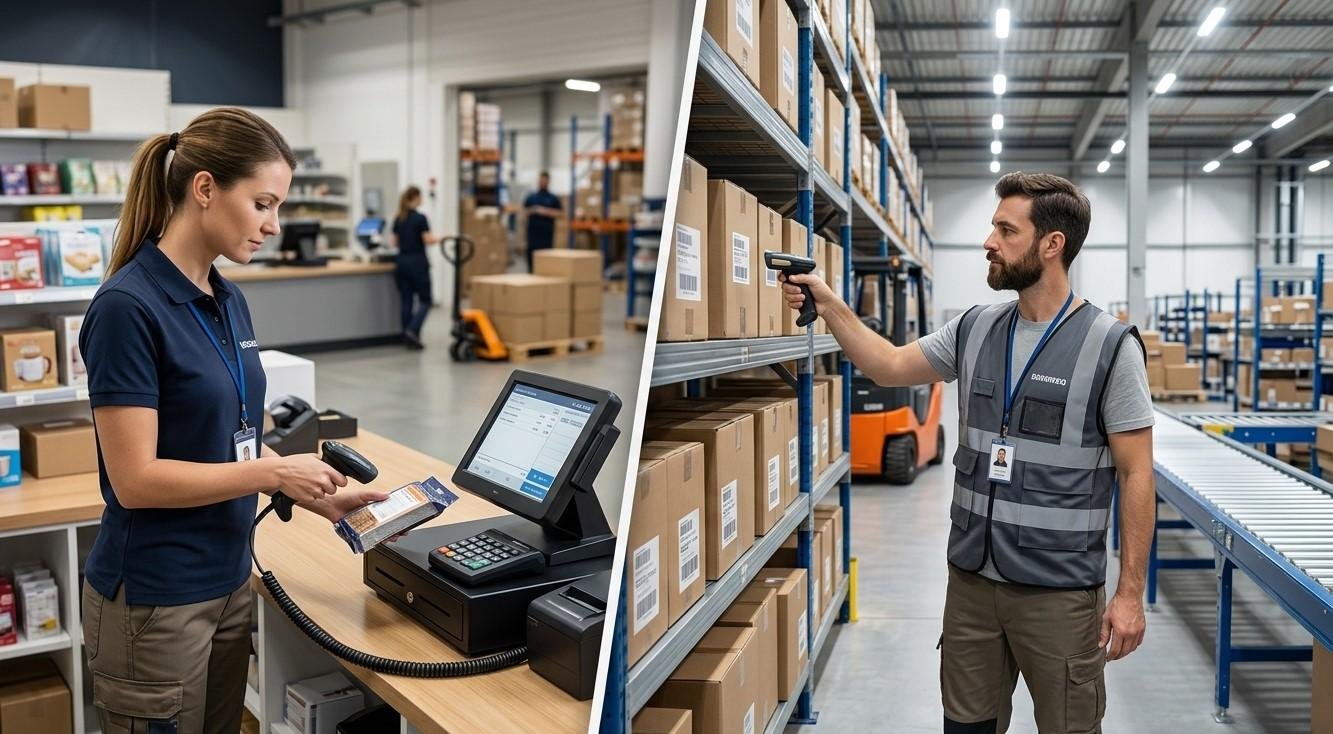
Barcode scanners have become an essential part of modern business operations. From warehouses and retail stores to manufacturing facilities, healthcare organizations, and logistics companies, businesses use scanners to capture product and inventory information quickly and accurately. However, choosing the right type of scanner can be challenging, particularly when deciding between a handheld barcode scanner and a wireless barcode scanner.
Both options can improve productivity and reduce manual data entry, but they are designed for different working environments and operational requirements. A handheld scanner connected by cable can be an excellent choice for fixed workstations, while a wireless scanner provides greater mobility and flexibility for employees who need to move around.
For businesses exploring reliable Pointus Solutions, understanding the differences between these technologies is important before making an investment. Whether you want to Shop Barcode scanners for a warehouse, retail store, or office, or need compatible Printing Products to support your barcode system, selecting equipment based on your actual workflow can provide better long-term value.
What Is a Handheld Barcode Scanner?
A handheld barcode scanner is a portable scanning device that is generally connected to a computer, POS terminal, or other host device using a cable.
The employee holds the scanner and points it toward a barcode. Once the barcode is read, the scanner sends the information directly to the connected system.
Handheld scanners are commonly used for:
- Retail checkout counters
- Inventory stations
- Receiving desks
- Shipping workstations
- Manufacturing stations
- Office applications
- Libraries
- Small warehouses
Their simple design makes them easy to deploy and maintain.
What Is a Wireless Barcode Scanner?
A wireless barcode scanner performs the same basic scanning function but communicates with its host device without requiring a physical data cable between the scanner and the workstation.
Depending on the model and configuration, wireless scanners may use technologies such as Bluetooth or proprietary wireless connections.
Wireless scanners are particularly useful when employees need to move around a warehouse, stockroom, retail floor, or production area.
For example, a warehouse employee can scan a product on one shelf, move to another location, and continue scanning without being restricted by a cable.
Handheld vs. Wireless Barcode Scanners
The main difference between these two options is mobility.
A traditional handheld scanner offers a straightforward wired connection, while a wireless scanner gives employees greater freedom of movement.
| Feature | Handheld/Wired Scanner | Wireless Scanner |
|---|---|---|
| Connection | Cable | Wireless |
| Mobility | Limited by cable length | High |
| Setup | Generally simple | Requires wireless pairing/configuration |
| Battery | Usually not required | Requires rechargeable or replaceable battery |
| Best for | Fixed workstations | Mobile workflows |
| Maintenance | Relatively simple | Includes battery management |
| Cost | Often lower | Often higher |
| Flexibility | Moderate | High |
The right choice depends on how and where the scanner will be used.
1. Consider Your Working Environment
The first question businesses should ask is where employees will use the scanner.
If scanning happens at a fixed counter or workstation, a wired handheld scanner may be sufficient.
For example, a retail cashier usually remains at a checkout station. There may be little benefit in paying extra for wireless functionality if the scanner never needs to move far from the POS terminal.
In contrast, warehouse employees frequently move between racks, shelves, bins, pallets, and packing areas. A wireless scanner may be much more practical in this environment.
2. Evaluate the Required Scanning Distance
Scanning distance is another important factor.
Some business operations require employees to scan products from very close range. Others involve large shelves, pallets, cartons, or storage racks.
Businesses should determine how far employees need to scan from the barcode.
For example, a warehouse may require longer-range scanning capabilities, while a retail checkout counter may primarily involve short-range scanning.
Choosing a scanner with the appropriate scanning range can make daily work more efficient.
3. Think About Employee Mobility
Employee movement is one of the biggest reasons businesses choose wireless scanners.
A wired scanner works well when the employee and scanning device remain close to the computer.
However, cables can become inconvenient when employees frequently move around.
Wireless scanners can allow employees to:
- Walk between warehouse aisles
- Scan products on shelves
- Check inventory in storage areas
- Move around receiving zones
- Scan cartons and pallets
- Perform stock counts
- Process mobile transactions
If employees spend significant time moving around during scanning activities, wireless technology may provide a noticeable productivity advantage.
4. Consider Your Scanning Volume
The number of scans performed each day should also influence your decision.
High-volume environments require scanners designed for continuous use.
Businesses should consider:
- Number of scans per hour
- Number of employees using scanners
- Operating hours
- Peak periods
- Expected future growth
A busy warehouse or retail operation may need durable scanners capable of handling intensive daily use.
For a small business with occasional scanning requirements, a simpler model may provide sufficient performance without unnecessary features.
5. Examine Battery Requirements
Wireless scanners rely on batteries, which means battery management becomes part of daily operations.
Before choosing a wireless model, consider:
- Battery life
- Charging time
- Number of batteries required
- Spare battery availability
- Charging stations
- Daily scanning volume
A wireless scanner with insufficient battery capacity can interrupt operations.
Businesses with long shifts should choose models that can support their expected usage or provide practical charging and battery replacement options.
6. Consider Durability
Warehouse and industrial environments can be demanding.
Scanners may be exposed to:
- Drops
- Dust
- Temperature changes
- Frequent handling
- Moisture
- Continuous daily use
A retail counter may require less rugged equipment than a warehouse or manufacturing facility.
When selecting a scanner, check its durability specifications and choose a model appropriate for the environment.
7. Think About Connectivity
Wireless scanners require a reliable connection to their host system.
Businesses should determine how the scanner will communicate with computers, tablets, POS systems, or mobile devices.
Depending on the equipment and application, connectivity may involve Bluetooth, wireless communication systems, or a dedicated scanner base.
Businesses should also consider the operating range required.
A wireless scanner may work perfectly at a small retail station but require different infrastructure in a large warehouse.
8. Evaluate Integration with Existing Software
A barcode scanner is only one part of the overall system.
The scanner needs to work properly with the software used by the business.
Common systems include:
- POS software
- Inventory management systems
- Warehouse management systems
- ERP platforms
- Asset tracking systems
- E-commerce systems
- Manufacturing software
Before purchasing equipment, businesses should confirm compatibility with their existing technology.
A scanner that performs well but cannot integrate smoothly with the company's software may create unnecessary operational challenges.
9. Consider Total Cost of Ownership
Price should not be the only factor when comparing scanners.
A wired scanner may have a lower initial cost and simpler maintenance. Wireless scanners may cost more because of their batteries, charging accessories, wireless components, and additional functionality.
Businesses should consider the total cost over the equipment's expected lifespan.
This includes:
- Purchase price
- Accessories
- Batteries
- Maintenance
- Replacement costs
- Employee productivity
- Downtime
- Software integration
A more expensive wireless scanner can be worthwhile if it saves significant employee time in a mobile workflow.
10. Choose Based on Specific Applications
Different business applications may favor different scanner types.
Retail Checkout
Wired handheld scanners are often suitable for fixed checkout counters.
Warehouse Picking
Wireless scanners can provide greater freedom for employees moving between storage locations.
Inventory Counting
Wireless scanners can make it easier for employees to move through aisles while recording stock information.
Receiving
Either option may work depending on whether receiving takes place at a fixed station or across a larger receiving area.
Manufacturing
The best choice depends on whether employees work at fixed production stations or move around the facility.
Handheld Scanners Are Not Always Less Flexible
It is important to remember that "handheld" and "wireless" are not necessarily opposites.
A wireless scanner is also a handheld scanner. The distinction is usually between wired handheld and wireless handheld models.
Both provide the convenience of handheld scanning, but wireless models add mobility.
This means businesses should first decide whether they need handheld scanning and then determine whether wireless connectivity provides enough value for their workflow.
How Barcode Printers Support Your Scanner System
Barcode scanning is most effective when paired with reliable barcode printing.
Businesses may need to create labels for:
- Products
- Inventory bins
- Warehouse locations
- Shipping cartons
- Pallets
- Assets
- Retail pricing
- Documents
High-quality Printing Products can help ensure that barcodes remain clear and readable.
Thermal label printers are commonly used for business barcode applications because they can produce consistent labels efficiently.
When scanners and printers are selected as part of one overall system, businesses can create a more reliable barcode workflow.
Common Mistakes When Choosing Barcode Scanners
Businesses can avoid unnecessary costs by considering their requirements carefully.
Choosing Based Only on Price
The cheapest scanner may not provide the durability, scanning range, or performance required.
Ignoring the Environment
A scanner designed for an office may not be appropriate for a warehouse.
Overlooking Battery Life
For wireless models, inadequate battery performance can interrupt operations.
Forgetting Software Compatibility
Always verify compatibility with existing systems before purchasing.
Buying More Features Than Necessary
Advanced features are useful only when they solve an actual business requirement.
Ignoring Future Growth
Choose equipment that can support expected increases in scanning volume and operational complexity.
A Simple Selection Checklist
Before you Shop Barcode scanners, ask the following questions:
- Where will the scanner be used?
- Will employees remain at a fixed workstation?
- How far away do they need to scan?
- How many scans are performed each day?
- Is wireless mobility important?
- What barcode types need to be scanned?
- Does the scanner need to withstand drops or harsh conditions?
- How long must the battery operate?
- What software must the scanner connect to?
- What is the expected future workload?
Answering these questions can make it much easier to identify the right equipment.
Conclusion
Choosing between a handheld wired barcode scanner and a wireless barcode scanner depends primarily on your business workflow. Wired handheld scanners are often an excellent choice for fixed workstations because they offer straightforward connectivity, simple operation, and potentially lower costs. Wireless scanners, meanwhile, provide greater mobility and can be particularly valuable for warehouses, inventory teams, logistics operations, and other environments where employees move frequently.
For businesses considering Pointus Solutions, the best approach is to evaluate the entire barcode ecosystem rather than selecting a scanner based solely on price. When you Shop Barcode equipment, consider scanning requirements, durability, connectivity, software compatibility, mobility, and long-term operating costs. At the same time, dependable Printing Products such as thermal printers, barcode labels, and ribbons can help ensure that every barcode is printed clearly and consistently.
With the right scanner matched to the right workflow, businesses can improve data accuracy, reduce manual entry, accelerate inventory processes, and create a more efficient barcode-based operation.
 Deutsch
 English
 Arabic
 French
 Spanish
 Portuguese
 Turkish
 Dutch
Dutch
 Italiano
 Russian
 Romaian
 Portuguese (Brazil)
 Greek
Greek